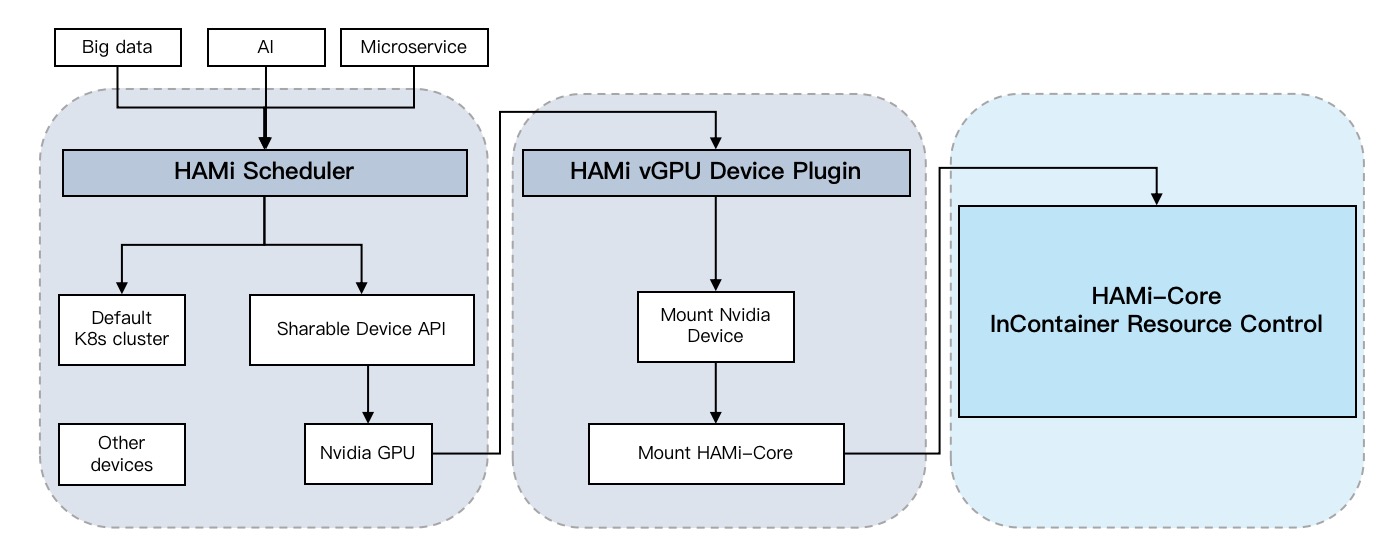
Architecture
HAMi extends Kubernetes with device-aware scheduling and runtime resource controls for heterogeneous AI accelerators. Its architecture separates cluster-wide placement decisions from node-level device allocation and, where supported, in-container enforcement.
What are HAMi's core components?
HAMi coordinates four components during the lifecycle of an accelerator workload:
| Component | Runs as | Primary responsibility |
|---|---|---|
| HAMi MutatingWebhook | Part of the hami-scheduler deployment | Directs Pods that request HAMi-managed resources to hami-scheduler |
| HAMi scheduler extender | Part of the hami-scheduler deployment | Selects a node and a physical device from a cluster-wide view of available resources |
| HAMi device plugin | DaemonSet on accelerator nodes | Registers devices with kubelet and prepares the selected device for the container |
| HAMi-Core | Library injected into supported containers | Enforces the assigned memory and compute limits at runtime |
The exact resources and enforcement mechanism depend on the device vendor. For example, NVIDIA workloads can request nvidia.com/gpumem in MiB and nvidia.com/gpucores as a percentage. Other devices expose vendor-specific resources and may support different allocation granularities. See the FAQ for the current support matrix.
How does a workload move through HAMi?
- Admission: When a Pod requests a HAMi-managed device, the MutatingWebhook sets
spec.schedulerNametohami-schedulerunless the Pod already names a scheduler. - Placement: The HAMi scheduler extender combines the Pod request with device information reported by each node. During scheduling, it filters nodes that cannot satisfy the request and selects a suitable physical device.
- Allocation: The scheduler records the selected device and quota in Pod annotations. On the chosen node, kubelet calls the HAMi device plugin, which reads that result and makes the device available to the container.
- Runtime control: For devices that support in-container control, the device plugin injects the required runtime library and configuration. For NVIDIA virtual GPUs, HAMi-Core intercepts relevant CUDA and NVML calls to apply the assigned memory and compute limits.
This division keeps cluster policy in the control plane, hardware discovery and allocation on each node, and workload-level enforcement close to the application.
HAMi MutatingWebhook
The MutatingWebhook is the admission entry point. It examines a newly created Pod's resource requests to determine whether HAMi should handle it. For eligible Pods, it sets:
spec:
schedulerName: hami-scheduler
Pods that do not request HAMi-managed resources continue through the normal Kubernetes scheduling path. Pods that explicitly choose another scheduler are not silently reassigned.
HAMi Scheduler
The scheduler is responsible for choosing both a node and a device. Kubernetes device plugins normally advertise integer resource counts, which are not enough to describe properties such as device model, memory capacity, compute capacity, health, or topology. HAMi device plugins therefore report detailed device information through node annotations, allowing the scheduler to maintain a cluster-wide view.
HAMi participates in the standard scheduling flow as a scheduler extender; it does not replace Kubernetes scheduling. It filters candidates according to the requested resources, applies the configured binpack or spread policy, binds the Pod, and writes the allocation result to annotations such as hami.io/vgpu-devices-allocated.
Device Plugin
The HAMi device plugin runs on each supported accelerator node and implements the Kubernetes device plugin API. It discovers local devices, registers allocatable resources with kubelet, reports device details for scheduling, and handles kubelet's Allocate request after a Pod is bound.
During allocation, the plugin reads the scheduler's result from the Pod annotations and exposes the selected device to the container. Depending on the vendor integration, it may mount device files and runtime libraries or inject environment variables that describe the assigned quota.
HAMi-Core
HAMi-Core provides runtime control for NVIDIA virtual GPUs through libvgpu.so. The device plugin loads the library into the container through /etc/ld.so.preload. HAMi-Core then intercepts CUDA memory allocation and kernel launch calls: allocations beyond the assigned memory budget return an out-of-memory error, while compute usage is throttled toward the requested limit. It also adjusts NVML results so applications see their assigned memory rather than the full physical device.
This is user-space enforcement, not a hardware security boundary. Applications that bypass the intercepted libraries—for example, by using direct driver calls or Docker-in-Docker—may bypass these controls. Use NVIDIA MIG when a supported GPU and hardware-enforced isolation are required. See GPU Virtualization Principles for the full interception and allocation flow.
How does HAMi compare with time-slicing and MIG?
| Approach | Sharing model | Memory and compute boundary | Best fit |
|---|---|---|---|
| Time-slicing | Workloads take turns on one GPU | No per-workload GPU memory isolation | Simple concurrency where strict quotas are unnecessary |
| HAMi virtual GPU | Workloads share a GPU with flexible requested quotas | User-space memory enforcement and compute throttling | Fine-grained, dynamic sharing across a broad range of GPUs |
| NVIDIA MIG | A supported GPU is divided into fixed hardware partitions | Hardware-enforced memory and compute isolation | Strong isolation on MIG-capable GPUs |
HAMi also supports dynamic MIG allocation, so these approaches are not always mutually exclusive. The right choice depends on the accelerator, workload, isolation requirement, and desired partition granularity.
Product architecture and reference deployment
This page describes HAMi's product components and the request lifecycle common to its integrations. A complete cluster can also include a CNI, vendor drivers and runtimes, monitoring, and an optional dashboard. For one NVIDIA-oriented deployment topology and its dependencies, see HAMi Cluster Architecture After Installation.
References
- Kubernetes device plugins
- Kubernetes scheduler extender design
- HAMi-Core source code
- NVIDIA Multi-Instance GPU user guide
What's next
- Explore the detailed GPU virtualization principles
- Review the reference cluster architecture
- Check the installation prerequisites